
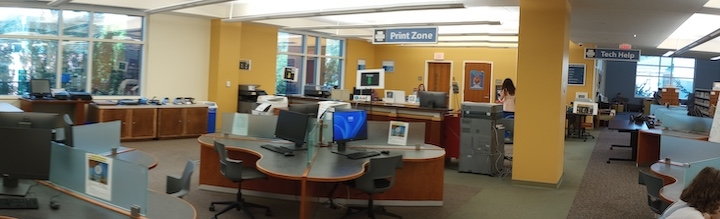
Printing, copying, scanning, and faxing are available in the Print Zone on the main floor of Belk Library. The Print Zone is staffed and managed by the university’s Information Technology Services department. The Tech Help Desk in the Print Zone also provides basic technology support.
Printers
- There are 5 printers on the main floor of the library and one on the lower level.
- All library printers can print in black & white or color.
- All library computers automatically print to these printers. The computers default to black and white, double-sided (duplex) printing.
How to Print
- Students, faculty, and staff should follow the PaperCut printing instructions and pricing information from IT Support Services.
- Pay using your AppCard Campus Cash account. You can add money to your Campus Cash account online using a credit/debit card ($5 minimum deposit), or visit the AppCard office in the Bookstore to add cash (no minimum deposit).
- Community members should speak to a worker in the Print Zone for assistance.
Poster & Large Format Printing
- Research poster printing and large format printing are available through the Tech Checkout Desk on the lower level of Belk Library, but not through the Print Zone on the main level.
Copying
- All printers in the library can also be used as black and white or color copiers.
- Costs are the same as for printing. See PaperCut printing instructions and pricing information from IT Support Services.
- Printers 1 and 2 in the Print Zone can copy materials up to 11×17″. Printers 3 and 4 can only copy standard size paper (8.5×11″) or smaller.
Scanning
- Printers in the Print Zone can scan to email or Google Drive.
- The Print Zone also has two additional scanners that scan to thumb drives, email, One Drive, smartphone, text-to-audio, Dropbox, and Google Drive.
- The Special Collections Research Center on the 4th floor also has a book scanner available for use during SCRC open hours.
Faxing
- We offer a free fax service (outgoing only) during the hours the Print Zone & Tech Help area is staffed. (Note that the library reserves the right to refuse any job over 25 pages.)